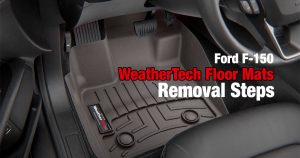
If you have a Ford F-150 and you want to keep its floor clean, WeatherTech floor mats are a great way to do it. They fight off dirt, spills, and wear. They’re custom-made to fit your truck just right. That way, every inch of your floor gets the protection it needs.
But to get the most out of these mats, you need to put them in correctly. That’s where these steps come in. They’ll guide you through the process, step by step. Before you know it, your truck’s floor will be ready for whatever you throw at it. It is straightforward, you just have to follow the process.
WeatherTech Floor Mats Installation In A Ford F-150
To install the WeatherTech floor mats, follow the steps below. It is not complicated, but following the steps will ensure that they stay in place and do their job of protecting the floor.
- Step 1: The first thing to do is to orientate the floor mats the correct direction. The WeatherTech logos on the mats should face out, towards the doors.
- Step 2: The drivers side one comes with a yellow note card that has the instructions on it. Save it in your owners manual for future reference.
Drivers Side Floor Mat Installation
- Step 3: Remove the old floor mats from the drivers side.
- Step 4: Clean the floor from any debris and vacuum it so it is clean.
- Step 5: Orientate the WeatherTech mat with the reservoir side towards the back – towards the seat.
- Step 6: Slide the front side of the mat under the gas and brake pedals.
- Step 7: Center the snap caps over the factory retention posts and snap them on.
- Step 8: Check to make sure that the gas pedal and the brake pedal have full movement and that the mat does not interfere with the movement.
Passenger Side Floor Mat Installation
- Step 9: Remove the old floor mats from the passenger side.
- Step 10: Clean the floor from any debris and vacuum it so it is clean.
- Step 11: Orientate the WeatherTech mat with the reservoir side towards the back – towards the seat.
- Step 12: Place the floor mat on the floor and slide the back of it back towards the seat posts.
Rear Floor Mat Installation
- Step 13: Lift up the rear seat and remove the old floor mats.
- Step 14: Clean the floor from any debris and vacuum it so it is clean.
- Step 15: Unfold the WeatherTech mat on a clean flat surface.
- Step 16: Find the front of the mat by locating the center cutout for the center console. The rear side of the mat will be straight.
- Step 17: Slide the front side of the mat under the front seats and position it tightly to the center console.
- Step 18: straighten out the mat so it is laying flat and then lower the rear seat.
Following this process should result in a beautiful new floor for your F-150 truck. Keep it clean by vacuuming it regularly and wiping it with a damp cloth.
In case of a spill you can remove the mat carefully and wash it with a hose and wipe it with a clean cloth afterwards. This will keep them nice and clean for many years.
Here is a video that displays the full installation process.
Why It Is Important To Install The Floor Mats Correctly
There are several important reasons why it’s crucial to install floor mats correctly in a pickup truck:
Safety:
- Prevents pedal interference: Improperly installed floor mats can bunch up or slide under the pedals, impeding their proper operation. This can lead to delayed braking or acceleration, potentially causing accidents.
- Improves traction: Floor mats provide additional grip for your feet, especially in wet or snowy conditions. This helps to prevent slipping and sliding, keeping you in control of the vehicle.
- Protects the floor: Floor mats shield the truck’s original floor from spills, dirt, mud, and debris, preserving its value and preventing wear and tear.
- Reduces noise: Properly installed floor mats can act as sound dampeners, reducing road noise and making the cabin a more comfortable environment.
Comfort:
- Provides a cleaner, more comfortable surface: Floor mats provide a clean and comfortable surface for your feet, especially during long drives.
- Protects from heat and cold: Floor mats act as an insulator, protecting your feet from the heat of the engine or the cold of the ground.
- Reduces fatigue: Properly installed floor mats can help to reduce fatigue by providing support and cushioning for your feet.
Aesthetics:
- Enhances the interior appearance: Floor mats can add a touch of style and personalization to your truck’s interior.
- Protects the interior from spills and stains: Floor mats help to keep the interior of your truck clean and stain-free, making it easier to maintain its appearance.
Ok, That Is All
So that’s how you install WeatherTech floor mats in a Ford F-150.
It might look like a lot of steps, but the process is pretty simple when you get into it. And the payoff? A clean, shielded and comfortable floor in your truck, ready for any adventure. Remember, clean them often and they’ll last for years. And if there’s a spill, just rinse it off. With WeatherTech floor mats, your floor’s best friend, your truck is ready for the open road! Safe travels!

Valik loves tinkering in the garage and is currently restoring a 2000 GMC Sierra 1500 truck. He also writes about the progress on this blog. When not in the garage, Valik is also a web developer and a blogger. I know, strange, a hand in two completely different worlds. And that is the way he likes to keep it.